12x12 Photo Background | Digital Scrapbook Layout
Tags: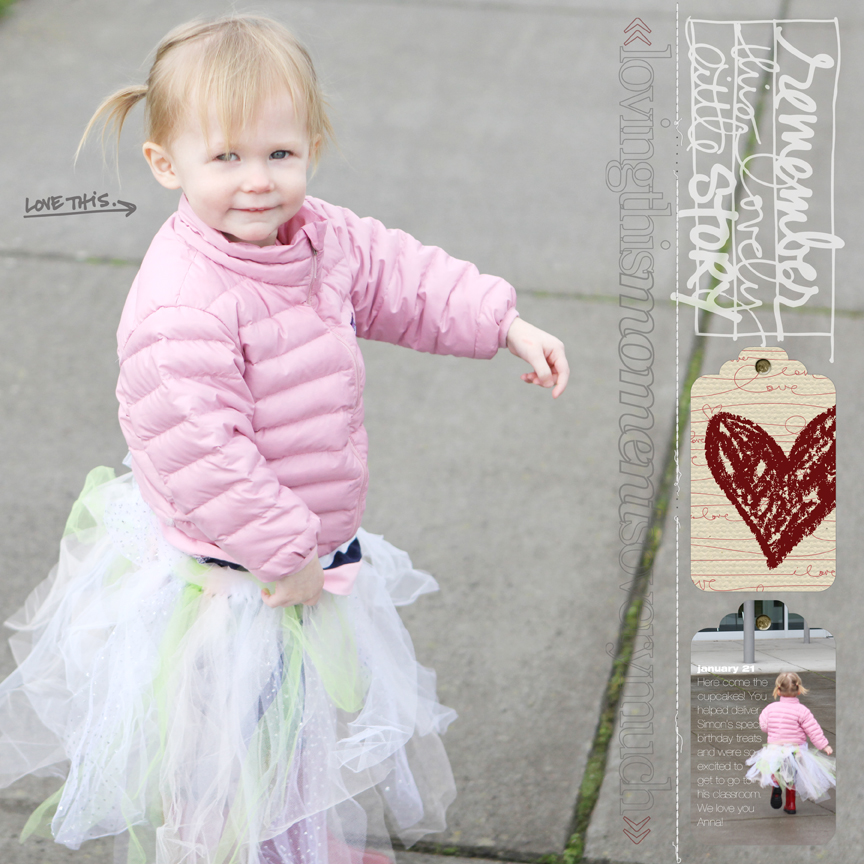
Click to view larger.
A couple ideas to consider:
1. Use a photo to fill your entire background. I've done this a few times in the past and I love it. Here's another recent one that's a traditional paper scrapbook layout (includes a how-to) which could be easily translated to digital.
2. Take an element, such as a tag, and mask a photo inside. The lower tag shown in the layout above is simply one of the Awakening Tags with a photo masked into it.
3. Add elements on top of other elements to create something new. I masked the crayon-drawn heart onto the middle tag to create a new design.
4. Using the eye-dropper tool take color from your photo and then repeat it two more times. I took a red color from Anna's boots in the bottom photo tag and recolored the crayon-drawn heart and the arrows on the long vertical word art.
5. Erase stuff to make it work. I erased the bottom portion of one of the journal blocks from my Story HandDrawn package because I just wanted to use just the word art. Don't be afraid to erase (make friends with saving and with undoing). Also don't forget that you can rotate things. I rotated the "remember this lovely little story" and adjusted it to be the same width as the tags so that they create a nice straight column along the right side.
6. Sometimes the story is short. Hooray! I added just a bit of journaling onto the masked photo tag that references the date, place and why we were there.
SUPPLIES
TAGS | AE Awakening Tag Collection
WORD ART | AE This One (coming this weekend), AE Outline Moments, AE For The Love Of Love, AE Story HandDrawn Journal Blocks
STITCHING | Anna Aspnes StraightLine Stitched White No.2Interested in getting started with digital scrapbooking or learning more about using your computer for telling your stories? Check out my list of posts and video tutorials on my Getting Started With Digital Scrapbooking page. All video tutorials can also be found in my Video Tutorial category archive or check them all out together on my Vimeo channel.


Comments
Sign in or sign up to comment.
42 comments
It's great, I love these kinds of layouts.
Replies
Sign in or sign up to reply.
What a great layout! I love how you masked the photo over the tag! Great idea.
Replies
Sign in or sign up to reply.
Love this fantastic xx
Replies
Sign in or sign up to reply.
L.O.V.E. this!
Replies
Sign in or sign up to reply.
so fabulous!
You may have already answered this somewhere along the way but...
do the tags match up with any particular paper punch?? I'd love to be able to punch them out.
Replies
Sign in or sign up to reply.
ADORABLE! I can't imagine having only a boy for so long and then adding a pink, frilly person to the mix! It's awesome!
She looks like your sister in this picture!
Can't wait to scraplift this whole page. Thanks, Ali!
Replies
Sign in or sign up to reply.
so cute and precious. love it
Replies
Sign in or sign up to reply.
Very cute. I like the layout, you can do alot with it.
Replies
Sign in or sign up to reply.
Perfect - I love using full photo pages
Replies
Sign in or sign up to reply.
OhMyWord so precious!
Replies
Sign in or sign up to reply.
"Love this" indeed! GREAT layout :)
Replies
Sign in or sign up to reply.
I realllllllllllllllly need to break down & get PSE now!
Replies
Sign in or sign up to reply.
Do you think any of this could be done on the NEW Ipad?
Just dreaming how easy it would be to get digital pages done during all the "waiting periods" of my day...
I suppose Photoshop requires too much memory for the Ipad???
Do you know??
Replies
Dee, you can't use the Photoshop program but there is an free app for the iPad (and iPhone if you can imagine that!) called Photoshop Express. And to answer your original question re size, PS is a memory hog. :(
http://itunes.apple.com/us/app/adobe-photoshop-express/id331975235?mt=8
Today when I am buying that Ipad2, I will quiz the helpful sales guys as I can't be the first person to ask this? For me it would revolutionize my scrapbooking. I don't do digital now, this would be "just the ticket!"
I have never used photoshop but do have an iPad - depending on how much memory photoshop used it could totally work on there I would think. Please comment back if you find it works as I have never used photoshop but would definately try it out if it worked on iPad. It would be amazing to be able to put pages together while waiting ... makes scrapbooking while travelling a whole new thing!!!
Hi Dee - I don't know the answer to that one. I haven't used an iPad yet so I'm not sure. Any one else?
Sign in or sign up to reply.
Such sweet photos ~ love this! I don't do any scrapping digitally, but this sure makes me wish I did!
Replies
Sign in or sign up to reply.
Oh Ali, this is precious of your little Anna. I so love incorporating your digital elements in my layouts, which are mostly hybrid. Sometimes I will purchase one of your layout templates both for the design and also because I love the elements you've included. I might use the whole template on a digital layout and then simply pull one of the elements (the layer from the template) and use it for a hybrid page.
I am loving the 'love this' arrow. Is that coming this weekend? Thanks so much for all of your creative inspiration and wonderful products Ali.
Replies
Yes - coming this weekend :).
Sign in or sign up to reply.
I love this!
Replies
Sign in or sign up to reply.
These are great tips--thanks Ali!
Replies
Sign in or sign up to reply.
Ali, if you don't mind me asking, how many megapixels is your camera? I have an 8 megapixel point and shoot and the pictures right out of camera are not high resolution enough to print 12 x 12 at 300 dpi. Thanks.
Replies
Laura - 8 MP is definitely enough.
Check your photo resolution setting. There are various terms, so look at the online user manual.
I have a Canon; one unnamed function has L, M1, M2, M3; photos save as low res, ~1Mb, ~2Mb, ~3Mb. The higher the resolution, the larger the file -- and the less files will fit on a memory card. Important when cards had 32Mb. With 4Gb and 8Gb cards - so what?
I use M1; my photo files are 14.4" x 10.8" when I initially open them in PSE. I should switch to M2 or M3 since PSE indicates my file has 180 ppi.
Hope this helps.
I think mine has 21. You definitely don't need that many to print 12x12 :).
Sign in or sign up to reply.
Love this!
Replies
Sign in or sign up to reply.
Love this Ali, what a great LO and I will say it again, your baby girl just makes me smile. What a doll
Replies
Sign in or sign up to reply.