Scrapbooking With Your Computer : Creating Layouts With Layered Templates (Video Tutorial)
Tags:Today I want to share a video tutorial (see below) that walks you through the process of creating a layout using a layered template in Photoshop Elements.
I have come to love layered templates. They are one of my favorite things about digital scrapbooking. They work so great as a foundation for your stories. I like that they take some of the additional thought out of the design process and let me focus more on the words and the photos.
To assist you in the learning process I am including a freebie layered template that is the same as the one I am working with in the video tutorial. Click the text below to download to your computer:
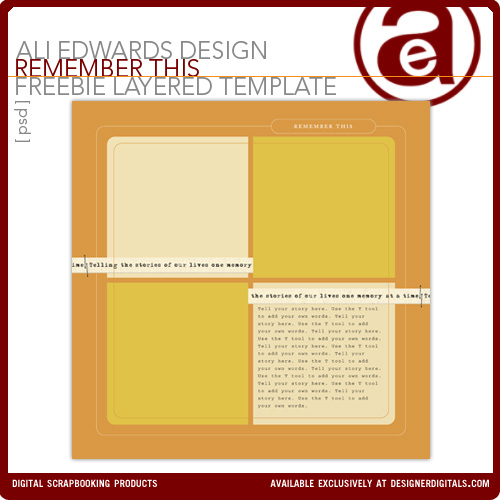
AEdwards_RememberThisFreebieLayeredTemplate
Here's a look at my completed layout:
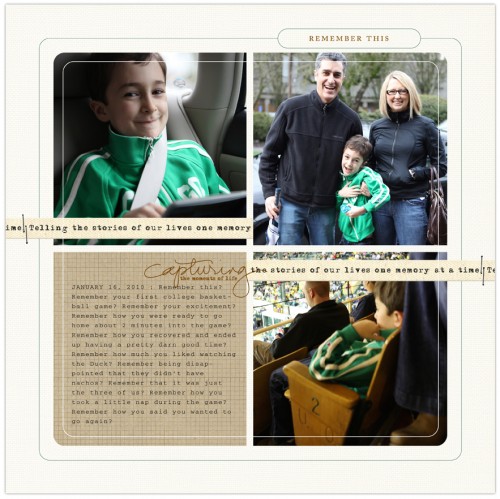
Supplies: Cardstock: Michelle Martin Just Linens No. 1; Pattern Paper: Katie Pertiet Krafty Ledger; Capturing Brush & Template: aliedwards.com
Because I am an advocate for not reinventing the wheel I am going to direct you to a previous layered template tutorial for specific written instructions on working with layered templates and a step by step walk-through with images using a different template. The steps and the process are essentially the same. Go here to access that tutorial.
Here are a just a couple quick tips from today's video tutorial.
I strongly suggest clicking the link below to watch this tutorial on Vimeo or download it to your own computer. The tutorial lasts just about 40 minutes (it's literally a step by step through my process).
Ali Edwards Digital Layered Template Tutorial from Ali Edwards on Vimeo.
Enjoy this tutorial and free download. GO TELL A STORY.
For other posts in my Scrapbooking With Your Computer series go here.
Today is Simon's 8th birthday. We've got some fun things planned for him, including taking cupcakes to his classroom. I can't believe it has been 8 years. What an amazing journey it has been so far.


Comments
Sign in or sign up to comment.
101 comments
Happy Birthday, Simon! 8 is a great age!
Thank you Ali for the tutorials.
Replies
Sign in or sign up to reply.
Thank you so much for the lovely template. Happy Birthday to Simon. Have a great day celebrating.
Replies
Sign in or sign up to reply.
Awesome tutorial, Ali!!! Thanks so much for this wonderful template :) Happy Birthday, Simon!!!
Replies
Sign in or sign up to reply.
Happy Birthday, Simon!!! Have a great special day!
My son turns 6 just in 4 days, I can't believe how fast the time flies!
Thank you for this awesome template, Ali. Lately I can't imagine scrapping without them, they just save so much time!
Replies
Sign in or sign up to reply.
Happy Birthday to Simon! 8 is a big year in terms of growing up in my experience :)
Replies
Sign in or sign up to reply.
Happy Birthday to Simon! Thanks for sharing your gifts with us! Have a wonderful day.
Replies
Sign in or sign up to reply.
Thanks for the template. I used your December Daily templates to create probably 20 layouts this Christmas, and loved them. Never really used templates a whole lot before I tried the daily layout project, and I am hooked now.
btw, another shortcut on the mac for masking layers together is to hold down the Option key, hover your mouse over the line between the two layers you want to join, and click.
Happy birthday to Simon!
Replies
Sign in or sign up to reply.
Happy Birthday to Simon! I can't believe it's been 8 years either; I feel like I've watched him grow through your wonderful words and photos for most of those 8 years. Thanks for allowing us to come along for the ride, Ali!
Lori
Replies
Sign in or sign up to reply.
So kind of you to offer this, Ali. Thank you. :)
Replies
Sign in or sign up to reply.
Happy Birthday, Simon! Cupcakes in the classroom...doesn't get better than that!
Thanks for this tutorial, Ali! You're the best!
Replies
Sign in or sign up to reply.
Happy Birthday, Simon!
Thanks for the tutorial and the freebie, Ali!
Replies
Sign in or sign up to reply.
Happy Birthday Simon!
Ali, thanks for the great layered template! I really appreciate all of the work you have put into this series. Have a great day with your little man!
Replies
Sign in or sign up to reply.
Oh this is such a great series!!!!! Templates I agree so allow you to get to the story. When I was traditional scrapbooking. I would spend so much time on designing the lay-out. And now I am totally into layered templates. There is so many options to make them your own. Happy B-day Sweet Simon:)
Replies
Sign in or sign up to reply.
WOW!! Thanks Ali..Happy Birthday Simon!!
Replies
Sign in or sign up to reply.
Thanks so much for the tutorials, Ali. Learning this has been one of my goals this year so I truly appreciate your time and effort.
HAPPY BIRTHDAY, SIMON!!!
Replies
Sign in or sign up to reply.
happy birthday Simon!! wow, he is growing up. i remember one time i took cupcakes to school for my son and he wanted me to make cooked frosting for the cupcakes. i think i even had to go to the store to get a cake mix first, also. i think the cupcakes were for a halloween party.
Replies
Sign in or sign up to reply.
Happy Birthday Simon! My little guy is 8 today too! Who knew 8 years would go so fast.
Replies
Sign in or sign up to reply.
hello Ali,
thanks a lot for this very interesting week !
do you know if free actions from Totally rad Actions are compatible with photoshop elements 6 ?
fred
Replies
Sign in or sign up to reply.
Thank you for the wonderful template. I'm a huge fan of all of your designs and supplies.
Happy Birthday Simon! I hope you have a wonderful day!
Replies
Sign in or sign up to reply.
Simon, Have a very Happy Birthday!
Ali, the timing of these posts could not be better for me. I got Elements for Christmas and signed up for Jessica Sprague's up and running class and this information is a perfect compliment. Thanks so much for sharing this information and for the free downloads! I have to agree, after I completed my first lesson of the Up and Running class, I saw how much easier it was to design the pages, or use a pre-desinged page, and I really did focus much more on the story. I included more journaling in my first digi layout than I have in ANY of my traditional layouts.
Replies
Sign in or sign up to reply.