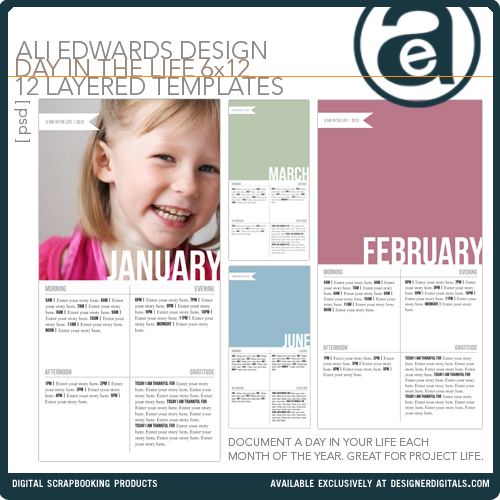
For 2013 I’m planning to do a Day In The Life each month as an additional insert to my Project Life album.
I’m hoping to include a little more in-depth documentation – capturing the nitty gritty flow of my/our day. I also know from experience that the process of capturing a specific point in time always challenges me to capture things I’ve been missing in my regular photo-taking routines.
Last year I did a Day In The Life in February. Here’s the posts that went along with that project:
- Overview + Free Download
- The Documentation
- Project Life 2012 | Week Six (the week I added in the Day In The Life content)
This year I’ve designed a set of 6×12 Day In The Life layered templates that I can use as inserts in Project Life. They include space for a photo plus areas for journaling morning, afternoon, evening and gratitude. Next week I’ll share a layered template tutorial for working with these new 6×12 layered templates.
My plan is to do my Day In The Life the last week of each month, most likely on the last day.
I’ll be documenting my first monthly day on Thursday, January 31 using a Daily Sheet for documentation. You can download a free set of Daily Sheets (originally designed for Week In The Life but you can choose to just print one page) here.
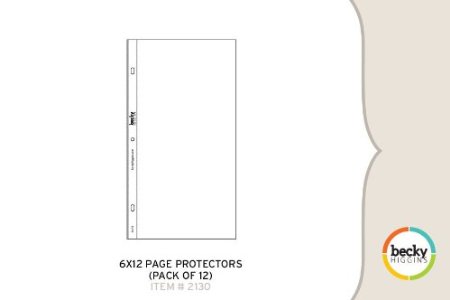
I’ll be using the Project Life 6×12 Page Protectors to include this content in my Project Life album.
I’ve also designed a 6×12 Photo Collage Template set to go along with the Day In The Life layered templates. They can be used in conjunction or on their own for anytime you want to add a 6×12. You can also combine the two together to create a 12×12 layout. I’ll be using these as the back page of the 6×12 insert to include photos I take throughout the day.

Like the idea of 6×12 layered templates? You can also check out my 6×12 Words And Photos Layered Templates and see how I used them in Project Life here.
WEEK IN THE LIFE 2013 | And in case you are wondering I do currently plan to embark on a Week In The Life project again this year as well. Most likely this will happen in the fall.
Consider yourself invited! I’ll post a reminder each month here on my site and via Facebook and Twitter.


Super cute, I think this would make a really great 6×6 album as well!
LOVE this idea! Thanks for the invitation!
What a GREAT idea – love it!
I was just thinking it was time to do a Day in the Life over the wekend. SOOOOOO excited to see this and LOVE the idea of doing it monthly. Thanks so much for the inspiration and ideas here to use. Count me in for tomorrow too! Will be interesting since my son is home sick, won’t be a normal day for us.
Fall is my VERY FAVORITE time of year so I cannot wait to do WITL with you then!!
Thanks Ali for such happy and fun posts today!
Such a great idea. To focus on a single day each month. I’m excited to be able to capture those little moments, as I know this year will bring a lot of changes to our daily routines. Thanks for the invitation!
Love, love, love this idea! I’ll be joining you in incorporating this into my own Project Life album… truly an inspired idea! Thanks Ali!
Hey this is great! Love this template!
What a great idea – I think I am playing along today
i like the idea of doing it monthly too! Ali, are the 6×12 templates already live at designer digitals? I can’t seem to find them!
They will be available on Friday.
I was about to ask the SAME thing..couldn’t find that set of templates
just re read the post and saw the availability! Sorry!
I love the idea of doing this monthly! Most of my favorite photos from 2012 came from doing Day in the Life and Week in the Life with you; thank you so much for inspiring the projects!
Another fabulous idea. I think I will join in tomorrow!
Love this idea! Definitely joining in on the fun!
Love this idea!
Love, love, love this idea! My daughter is almost 17 months old and things change so much each month. This will be a great record to have of all the changes that happen during the year.
Of course I wish I would have done this before she came into our lives, too. I didn’t do much documenting before because I thought my life was boring. Ha! I can’t even remember what our days consisted of then. Such a shame…our lives are worth capturing! It’s such a gift to have these snapshots of certain times in our lives to look back on.
I’m also committing to creating one of the photo/video slideshows from Xanthe Berkeley’s Time Capsules class at least once a quarter. I’ve only done one so far but it’s such a cherished memory and will be added to my PL album.
Thank you, as always, for the inspiration Ali!
I am going to be spontaneous and make this happen today ad once a month! I am not up for project life weekly due to a beyond crazy schedule – but this I can do, and it”s a great way to use my PL supplies!
oh my goodness – these rock! your inspiring as usual. i’m doin’ this tomorrow! thanks so much.
so love this! Thank you!
Dude. I know I said on Twitter that I was excited, but each month? Such a cool idea to go with PL!
wonderful!! so excite to participate tomorrow
Awesome! I’ve been doing this on the 8th of each month since November 2010 (started it monthly after doing the DIYL project for your Yesterday & Today class). It’s an amazing way to document some of life’s swiftly moving changes. So excited for the templates. I love the format you’ve created. Thanks!
That is so awesome.
THANK YOU THANK YOU THANK YOU! I love that you included the STUDIO files. I know how to convert the files, but it’s so nice that you’ve included them!!! I hope you release more STUDIO FILES. I’d definitely pay for them!
Hi Jennifer – that was just for the freebie
. Silhouette does not give permission for other people to sell STUDIO files.
A can’t find the Day in the Life templates on DD. Have they been released yet?
They will be in the store on Friday.
Total love (as always) Ali! My WITL albums are a family favorite for sure! This is a cute add-in for PL and seems less overwhelming than that weekly project for sure! Consider them purchased!
I LOVED the day in the life documentation I have from last year and LOVE the idea of doing this once a month.
Once again…you’re simple brilliance shines through!
Love the format….. Can’t wait to participate, its definitely going to be an eye opener to break down the day hourly… A great exercise to go with my one little word FOCUS.
I actually think I’m going to try using a single PL page protector (front and back) to document this. I don’t want to commit to PL full time but this is a way to get my feet wet… off to order some!
I love this idea! I’m just starting project life but I’m totally borrowing your idea!
Sounds great!
Count me in. Thanks for this great idea!
Doing it. And buying those templates for sure
THANKS ALI! I will use these well and looking forward to 2013 Week in The Life as well.
Whoops, l’ve only just read your post – and it’s already 11:46am on the 31st of January……wished l had of seen it earlier.
Might have to make my documentation the first day of the month, rather than the last…..darn international time difference!
Really love the idea. Although I’m not sure of whether l will be able to take on this project on top of my first year of Project Life and everything else that’s going on here – but let’s give it a whirl and see what happens hey?
Ali, your templates are just what I’ve been looking for! I have been wanting to highlight my photography improvements as an insert for PL each week and I have been hunting for a 6×12 template – just like these! thank you!
I’m in! Awesome idea! The process requires effort, but is SO worth it when you look back on it. Very excited to join you in this adventure.
thank you
a
Love all your templates – will you be doing a set in 12×12?
where are the photo collage templates?
They will be available (along with the Day In The Life templates) on Friday (tomorrow).
Ali, are you only using a single photo to represent the entire day? Not photographing throughout the day as in previous “day in the life” days? (I’m just noticing that there’s a single photo of Anna for the month of January)… Thanks! (I’m documenting and photographing it all, just in case!)
I’ll be using the 6×12 photo collage template to add photos to the back of the page protector (see image above).
This is fantastic! It’s the perfect thing to “spice up” our PL album. Thank you, Ali! Can’t wait to get the templates.
The daily sheets are not popping up when I hit them. Nothing is there when I try to find them…bummer. I love the idea of adding to project life.
Are you trying to download them from this post? http://aliedwards.com/2011/07/week-in-the-life-thoughts-on-the-process-daily-sheet-pdf.html
You rock! Thank you!
I’m in! I saw this post yesterday, on the way home from our Whistler vacation. I was feeling glum, the post-vacation let down and felt a little boost at the thought of documenting a ‘normal’ day at home. Kind of helps get back into the swing of things and appreciate the things that make regular life special, just as vacation life has its own special moments. Thanks, Ali!
Nice, Ali!! Just curious, that means you are not going to do the Week in the Life project this year??
Hi Fanny – planning to do that this Fall (talked a bit about it at the bottom of the post above).
YAY for Week in the Life this fall! I already have an album ready to use for that project!
i LOVE this idea! my favorite from last year was the WITL from april. so much so that i decided to do it again in october. i was just thinking that i needed something to catch our lives more than PL… and this popped up. thank you!
Hi Ali
I followed your link to the overview and free download that you did in February last year. Does the free download have an expiry date? I click on the link and go nowhere?
Thanks for all that you do… you truly do inspire others…..
Cheers
Awesome idea!
Great idea! I’ve been wanting to do a few “day in the life” things this year but didn’t want to add to my first year in PL. Never thought of combining them! Can’t wait to see yours!
Ali,
I just purchased your 6×12 layered templates from Designer Digitals for A Day in the Life – they are very cool! However I am having a problem, when I insert the picture into “January” the banner on top shows up but not the word January on the bottom? What am I doing wrong? Working in PSE.
Did you you clip the picture to the January photo layer (ctrl + G) or just resize the photo to the box size? The months are a negative image on the photo box layer so you have to clip your picture to it for the word to show up. Hope that makes sense…and helps.
Had the same problem, but Sierra’s recommendation worked! Yay! Thanks Sierra!
Thanks everyone – I just kept hitting buttons and it finally worked – for some reason control g did not work?
Love this! I recorded yesterday (can’t believe it’s already February now!) and now purchased the layered templates from Designer Digitals. However, when I open it in CS5 I get a warning: “Some text layers are containing fonts that are missing. These layers will need to have the missing fonts replaced before they can be used for vector based output”. When looking further there are warning sign “labels” on almost all layers. If I interpret this correctly I don’t seem to have the “BebasNeue” font. I googled this and it looks to be a free font, so I will try to download this to see if the template works.
But just sending this question – is this how I should do to get it to work? (Anyone else having the same problem?)
Finally I had time to try this out. Yes – after downloading and installing the “BebasNeue” font it worked!
I am missing the other font, but because it is mixed with BebasNeue, my computer is just telling me that they layer contains fonts that are missing, but does not tell me what the missing font is. The font I’m looking for is the body text font. Does anyone know the name of that font?
I think I figured it out: Garamond!
Glad you guys were able to figure it out. Yes – Bebas is a free font that you need to download if you want to use that same font (you could also substitute it with something else too). Having it that way allows you more flexibility for those that might want it. And yes – garamond is the journaling font.
Thanks, Ali! I hadn’t heard of Bebas previously, and I’m LOVING it. It’s such a great title font. I love that it’s vertically justified. I can see myself using it on a lot of projects in the future! Awesome added bonus to the template
Oh I missed it… Maybe I can start it in February instead
love the idea of doing it monthly.
Me too Libby… I wish I would have thought of this.. but I guess I will do it Feb 28th!